2026 CDCFIB Shortlist: Step-by-Step Process & Ultimate Screening Guide
Shortlisted for the 2026 CDCFIB recruitment? Discover the exact step-by-step document upload process, venue screening requirements, physical dress code rules, and expert solutions for common portal errors to secure your interview stage. Stop moving about submitting application letter that doesn’t resonate with HR requirements.
2026 CDCFIB Shortlist: Step-by-Step Process
If your name is on the 2026 Civil Defence, Correctional, Fire and Immigration Services Board (CDCFIB) shortlist, congratulations! Getting shortlisted is a massive milestone, but it is only the first step. The window to act is incredibly tight, and missing a single instruction can get you disqualified immediately.
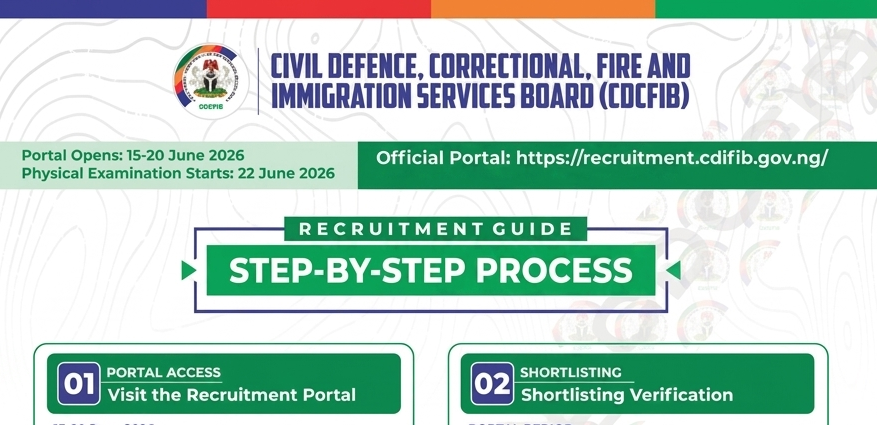
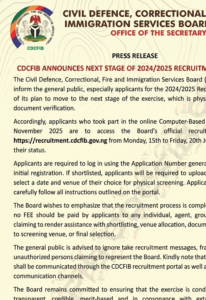
The CDCFIB portal officially opens for shortlist verification and document upload from 15th to 20th June 2026, and physical examinations begin nationwide on 22nd June 2026.
This comprehensive guide breaks down exactly what you need to do right now, the documents you must upload, how to prepare for the physical examination, and answers to the most urgent questions applicants are asking across TikTok and Facebook.
Key Timeline & Critical Dates to Remember
Do not wait until the last minute. The portal is open for just a few days, and system traffic will be high.
- Portal Upload & Verification Window: 15th June – 20th June 2026
- Commencement of Physical Examination: 22nd June 2026
- Official Recruitment Portal: https://recruitment.cdcfib.gov.ng/
Phase 1: Portal Access & Shortlist Verification (15-20 June 2026)
Before you pack your bags for the screening venue, you must log into the official dashboard to verify your status and secure your examination slip.
Step 1: Visit the Official URL
Ensure you only access the portal via https://recruitment.cdcfib.gov.ng/. Beware of fraudulent duplicate websites or agents claiming they can check your name for a fee. The checking process is completely free.
Step 2: Status Verification
Enter your Application Number to verify your status. Use the exact application number assigned to you during the initial registration phase.
- Security Tip: Do not share your application number with third parties or in public social media comment sections.
Phase 2: Document Upload & Examination Scheduling
If the system automatically verifies your application number as shortlisted, you will immediately proceed to the document upload stage. Non-shortlisted candidates will be stopped at this point.
Step 3: Upload Supporting Documents
You must upload all required supporting documents as specified by the board for your specific cadre.
- Select Venue & Date: After uploading, you will be prompted to select your preferred date and closest examination venue.
- Act Fast: Venue slots are strictly limited on a first-come, first-served basis. Select your center quickly before slots fill up.
- Confirm Submission: Double-check every document to ensure clarity before hitting the final submit button. Once the portal closes on June 20, changes cannot be made.
Step 4: Download and Print Your Examination Slip
Immediately after confirming your submission, the system will generate an official Examination Slip.
- Download and print at least two copies for safekeeping.
- Verify that your name, data, venue, and candidate number are perfectly correct on the printed slip.
- Note: This slip is your mandatory entry pass to the physical screening center. Safeguard it carefully.
Phase 3: Physical Examination & Screening Requirements (Commencing 22 June 2026)
Once your documents are submitted online and your slip is printed, you must prepare for the physical evaluation starting 22nd June 2026.
What to Bring to the Screening Venue
- Your Printed Examination Slip: Original copy.
- Original Credentials: Bring the physical originals of every document you uploaded to the portal (Birth certificate/Age declaration, Primary/Secondary school certificates, Higher degrees, and Local Government Identification).
- Photocopies: Keep at least two neat sets of photocopies of all credentials in a clean file jacket.
Physical Screening Protocols
- Punctuality: Arrive at your designated venue at least 30 minutes before your scheduled time. Late arrivals face a high risk of being denied entry at the gates.
- Behavior: Follow instructions from the screening officers strictly. The process involves physical measurements (height, chest width) and medical fitness checks.
Strategic Guide: Navigating Missing Certificates and Portal Errors
Many candidates face discrepancies between the rank they applied for and the documents the portal demands. Here is how to strategically handle these roadblocks:
1. Applied with National Diploma (ND) but Portal Asks for NYSC
If you applied for a position like Assistant Inspector (General Duty) using a National Diploma (ND) or NCE, the system may occasionally glitch and display a mandatory field asking for an NYSC Discharge Certificate or Letter of Exemption—credentials only meant for Bachelor’s Degree (B.Sc.) or Higher National Diploma (HND) holders.
- The Fix: If the portal rigidly prevents submission without a file in that slot, combine your ND certificate and an official letter of explanation into a single PDF document and upload it, or upload your ND statement of result in that slot to complete the loop. Concurrently, use the portal’s internal support desk or official contact channels immediately to report the configuration error.
2. Missing Higher Certificates (B.Sc. / NYSC)
If you registered strictly using an O’Level certificate (WAEC/NECO) for a lower cadre position, you do not need to worry about higher education certifications. Upload only the credentials used during your initial application.
However, if you applied for a Superintendent cadre or Inspectorate cadre that requires a B.Sc. or HND, you cannot skip uploading your degree and NYSC certificates. Omitting them will lead to automatic disqualification during the online verification phase.
Author’s Tip
From my years of coaching candidates through high-stakes recruitment drives, the biggest trap is disorganization. Before you step foot into the venue on June 22, arrange your original documents and photocopies chronologically in a clear, labeled plastic file jacket. When screening officers are processing hundreds of nervous applicants, the candidate who hands over an impeccably organized file instantly projects discipline, authority, and competence, qualities that set the tone for a successful screening up to the final stage.
CDCFIB 2025 Dress Code for Physical Screening is white-white
- White shirt.
- White short.
- White socks.
- White shoes or canvas.
Hairstyle for Women: All back weaving.
Hairstyle for men : Neatly shaved.
PS: Anything that makes you look irresponsible and be judge at first sight, Do not wear it there, all those Leg chains, aboki nose rings, visible tattoos etc. Don’t wear materials that are revealing especially the ladies.
Frequently Asked Questions (FAQs)
What is the official dress code for the CDCFIB physical and medical screening?
Ans: For the physical fitness assessment and medical screening, you are required to dress appropriately for physical activity. The standard dress code is plain white shorts, a plain white T-shirt, white socks, and white canvas shoes/sneakers. Avoid branded or colored clothing. Dressing correctly ensures ease of movement during physical checks and project compliance.
I don’t have a B.Sc. or NYSC certificate. Can I upload only the WAEC certificate I used during registration?
Ans: Yes. If you applied for a position that only requires O’Level qualifications (such as the rank of Constable or its equivalent in the Fire or Immigration services), you only need to upload your WAEC/NECO certificate. Only positions in the Superintendent or higher Inspectorate cadres require a degree and NYSC certification.
I applied with my ND certificate, but the portal is asking for an NYSC certificate/exemption letter to finish the upload. What should I do?
Ans: This is a common portal structural issue for the Assistant Inspector rank. National Diploma (ND) holders are not eligible for NYSC, so you do not possess this document. To complete your application, try uploading your ND certificate or an affidavit/statement explicitly confirming your qualification level into that slot, then closely monitor official CDCFIB communication channels for updates regarding portal configuration fixes.
What is the preparation for the physical screening like?
Ans: Physical screening involves verification of your physical identity and basic fitness checks. Expect height and chest measurements (ensuring you meet the minimum requirements), checks for physical deformities, sight tests, and basic endurance checks. Prepare by resting well, staying hydrated, arriving 30 minutes early, and ensuring all your paperwork is impeccably arranged.
After this physical and medical screening phase, what is the next step?
Ans: After the physical examination phase concludes, the board will collate scores and screening reports. Successful candidates who pass the physical and initial medical benchmarks will proceed to Phase 2: Fitness and Oral Examinations. Announcements regarding qualified names will be published exclusively on the official portal.
What are the exact documents required at the physical screening venue?
Ans: You must bring your original printed CDCFIB Examination Slip, your O’Level certificates (WAEC/NECO/NABTEB), your higher qualifications (ND/HND/B.Sc. if applicable), your NYSC discharge or exemption certificate (for degree holders), your Birth Certificate or Statutory Declaration of Age, and your Certificate of Local Government Origin. Bring both the originals and photocopies.
Can I change my screening date or venue after confirming my submission?
Ans: No. Once you confirm your submission on the portal, your venue and date allocation are permanently locked into the system. Slots are limited, which is why you must plan carefully and select a location that you can easily and reliably access by June 22, 2026.
Does being shortlisted guarantee that I have secured a job with the CDCFIB?
Ans: No. Being shortlisted means you have successfully passed the initial document filtering stage. You must still pass the physical screening, background checks, and subsequent fitness/oral examinations. Final recruitment decisions depend entirely on your overall performance and the vacancy limits of the respective agency.
Is there a need to obtain a medical fitness certificate from a hospital before coming to the venue?
Ans: No, you do not need to go out and pay for a medical fitness certificate beforehand unless specifically instructed on your newly printed examination slip. The CDCFIB conducts its own preliminary medical screenings, physical measurements, and health checks directly at the venue. Your primary focus should be on gathering your structural academic credentials and arriving physically prepared.
Are we strictly expected to appear in all-white attire for the physical screening?
Ans: Yes, absolutely. You are expected to appear in “white and white”—meaning a plain white T-shirt, plain white shorts, white socks, and white canvas shoes or trainers. This is the standard, mandatory uniform for uniform-service physical fitness tests in Nigeria. Wearing colored or branded attire can lead to unnecessary delays or outright denial of entry at the venue gates.
Is the CDCFIB shortlist 2026 out?
Yes, the Civil Defence, Correctional, Fire and Immigration Services Board (CDCFIB) has progressed to the physical screening and document verification phase for the 2024/2025 recruitment exercise.
When is the CDCFIB shortlist coming out for 2026?
The verification portal for shortlisted candidates was officially opened between June 15 and June 20, 2026. If you participated in the Computer-Based Test (CBT) in November 2025, you should check your status on the official recruitment portal.
How can I view the list of shortlisted candidates for CDCFIB 2026?
There is no public PDF file of names. To check if you are among the shortlisted candidates, visit recruitment.cdcfib.gov.ng, log in with your application number or NIN, and view your status on your personal dashboard. If you are shortlisted, you will be prompted to upload your credentials and select a screening venue.
Important Anti-Fraud Notice
The Civil Defence, Correctional, Fire and Immigration Services Board (CDCFIB) has made it explicitly clear: the entire recruitment process is completely FREE. Beware of fraudulent agents, scam websites, or individuals claiming they can influence the shortlisting or final employment process in exchange for money.
Do not pay anyone. Monitor only the official website (https://recruitment.cdcfib.gov.ng/) and official verified social media channels for authentic updates.
Kindly subscribe and share this post update. Thanks for reading!